
The Miracle Box
ChillSeekersLifestyle
3.3212.00 Reviews
- Version
- 1.32
- Installs
- 10.00K
- Age Rating
- Teen
Screenshots

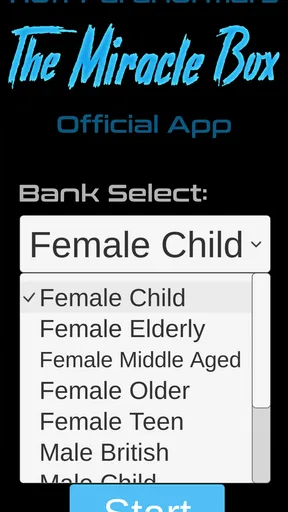
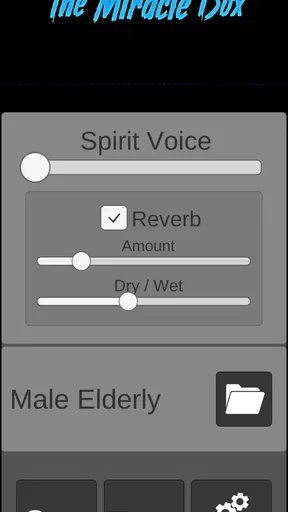
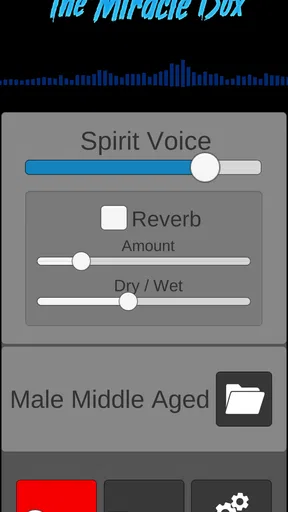
Our Review of The Miracle Box
 Analysis by Appyee
I’d approach The Miracle Box as a paranormal listening tool, not as a phone-repair utility. It is a lifestyle app from ChillSeekers, built around methods associated with Steve Huff of Huff Paranormal. That focus makes the experience quite different from the usual lifestyle app: the point is to create a setting for listening and interpretation, rather than to manage a routine or solve a practical task.
Set the scene before you begin
The app makes the most sense when you already know what you want from a session. If you are curious about paranormal audio methods, set aside a quiet stretch of time and decide whether you are exploring out of interest, testing a personal belief, or simply looking for an unusual activity to share with friends. Going in with a modest aim helps: listen carefully, note what stands out, and avoid treating a sound or impression as proof of anything.
That small bit of preparation matters because this kind of experience depends heavily on attention and expectation. Background conversation, a television in another room, or even the urge to find a particular answer can shape what you think you hear. I would keep the first session short and calm, then decide whether the method is engaging enough to revisit. It is easier to judge the app on its own terms when you are not trying to force a dramatic result.
Move from curiosity to a useful session
A practical workflow is simple: choose a quiet place, make sure everyone taking part understands the activity, and approach the listening as an experiment rather than a guaranteed encounter. If you are using it with someone else, agree in advance on how you will discuss what you hear. Let each person describe their impression before comparing notes; that reduces the chance that one person’s suggestion steers everyone else toward the same interpretation.
I would also keep a written note of the question or theme you had in mind and what you thought you heard, without rewriting it afterward to fit a stronger story. This is a useful habit for any ambiguous audio experience. It gives you a clearer record of your first reaction and makes repeat sessions less likely to blur together. If a session feels unsettling, stop rather than pushing through for the sake of a result.
The app costs $2.99, so I would think of the purchase as paying for a focused, niche experience rather than buying a dependable answer or a collection of guaranteed paranormal evidence. It is rated for teens, which makes it more approachable than material aimed at adults, but that does not mean every teen will enjoy eerie or unexplained themes. I would use it with younger listeners only if they are comfortable with the subject and understand that interpretations are personal.
How it fits beside other ways to explore
Compared with watching paranormal videos, this app puts more emphasis on taking part and making your own observations. Videos give you a finished narrative, often with someone else explaining what to believe; a listening session leaves more room for uncertainty. That can be the appeal, but it is also the trade-off. If you want a clear story, a documentary or podcast is likely to be more satisfying. If you want a quiet activity that invites discussion, the app’s method is a better fit.
It is also different from general-purpose audio or meditation apps. Those usually aim to relax you, entertain you, or provide a predictable soundscape. This experience is for people interested in paranormal methods, and it may feel too narrow if you simply want background audio. I would not choose it as a replacement for a meditation routine, a sleep aid, or an ordinary music player; its value depends on being interested in the specific subject.
One useful group approach is to have each listener write down their impressions separately before anyone talks. Then compare notes and mark which observations were shared and which were individual. That does not establish what caused a sound, but it makes the discussion more honest and helps prevent confident guesses from turning into a group consensus. For a solo session, the equivalent is to jot down a brief note immediately afterward rather than replaying the memory until it changes.
Who will get the most from it
I can see this working well for paranormal enthusiasts who enjoy forming their own impressions, as well as for friends looking for a low-key, unusual evening activity. It may also suit someone curious about the techniques associated with Steve Huff who wants to explore them directly instead of only hearing other people describe them. The app has a focused purpose, so a little curiosity about that purpose goes a long way.
I would skip it if you expect a reliable way to communicate with spirits, a scientific instrument that settles questions, or a broad set of everyday lifestyle tools. It is not a good choice for someone who finds paranormal themes distressing, or for a group that tends to turn ambiguous experiences into pressure to agree. In those situations, a neutral podcast or a non-paranormal activity is a better use of the time.
What the rating suggests, and what it cannot decide
The app has an average rating of 3.2 from around 460 ratings, with more than 200 written reviews and over 10,000 installs. I read that as a sign of a niche product with mixed reactions, not as a verdict on whether a session will be meaningful to you. Experiences involving interpretation are especially personal: one listener may value the atmosphere and method, while another may want clearer guidance or a more concrete outcome.
It runs on Android 6.0 or later, and version 1.32 is the current release. That gives Android users a straightforward compatibility point to check before paying. If you are considering it on another platform, verify that the version available to you matches your device and expectations before committing. The app’s subject is quite specific, so I would make that small check part of the decision rather than assuming it will suit every phone or setup.
Where expectations can get in the way
The main limitation is built into the activity: ambiguous input can produce ambiguous conclusions. A compelling impression can feel significant without being independently verifiable, and a quiet or uneventful session may leave you wondering what the app added. Neither outcome necessarily means you used it incorrectly. It means the experience is better judged by whether you find the process engaging than by whether it delivers a particular answer.
There is also a social friction point. In a group, someone may be eager to interpret every sound while another person is skeptical or uncomfortable. I would agree on a simple ground rule before starting: describe what you noticed, separate that from what you think it means, and let anyone opt out without being teased. This keeps the activity enjoyable and avoids turning curiosity into a test of belief.
For a more careful comparison between sessions, keep the setting as consistent as is practical and avoid changing several things at once. If you move rooms, add conversation, and change the question together, it becomes hard to know why the experience felt different. This is not a guarantee of objectivity; it is just a way to make your own observations less muddled. The app is most rewarding when you treat those notes as a record of your experience, not as evidence you have to defend.
What’s Inside the Box?
So, what exactly is The Miracle Box? Well, imagine an app that’s a Swiss Army knife for all things mobile tech. It’s primarily designed to help with phone repairs, software fixes, and unlocking devices. Whether you’re dealing with a stubborn phone that won’t boot or need to unlock a network, this app aims to have you covered.
Features That Stand Out
Let’s break down some of the features that make this app a bit of a lifesaver. First up, it’s got a comprehensive suite of tools for flashing firmware and unlocking phones. I’ve had a go at these, and they’re surprisingly intuitive. The app guides you through each step, so even if you’re not a tech whiz, you can follow along.
Another neat feature is the IMEI repair tool. If your phone’s IMEI has gone haywire, this app can help set things straight. Plus, it supports a wide range of brands, so whether you’re team Android or iOS, you’re in pretty good hands.
Using the App: My Experience
Now, let’s chat about the actual user experience. Setting up the app was a breeze. It’s available for both Android and iOS, and the download is straightforward. Once installed, the interface is clean and user-friendly.
When I tested the flashing tool, I was pleasantly surprised by how simple the process was. The app walks you through each step, and there are plenty of resources and tutorials available if you get stuck. It’s like the app anticipates your questions and has answers ready.
Is It All Sunshine and Rainbows?
Now, as much as I’d love to say this app is perfect, there are a few quirks. For starters, some features are locked behind a paywall. While the free tools are pretty robust, unlocking the full potential of the app requires a purchase. It’s not a huge deal, but something to keep in mind if you’re planning on using it extensively.
Also, while the app supports a lot of devices, there were a few newer models that seemed to be missing from the list. It’s worth checking if your device is supported before diving in too deep.
Final Thoughts
In a nutshell, it’s a solid tool for anyone looking to perform some DIY phone fixes. It’s packed with features that cater to both newbies and seasoned techies alike. If you’re willing to invest a bit for the premium features, it could definitely save you a trip to the repair shop.
In conclusion, if you’re the kind of person who likes having a bit of control over your tech, this app is worth a shot. It’s not perfect, but it does a pretty darn good job at what it promises. So, next time your phone’s acting up, you might just want to reach for it and see if it can work its magic.
One important correction before you decide
There is a serious mismatch between the paranormal listening purpose described at the start and the phone-repair claims in the later sections. I would not rely on those repair instructions: they are not a sound basis for choosing this lifestyle app, and firmware flashing, unlocking, or changing an IMEI can carry real risks when attempted without the right tools and expertise. In particular, changing an IMEI may be unlawful in some places. Treat the earlier repair-focused claims as unreliable rather than as capabilities to test on your device.
For a phone that will not boot or needs legitimate servicing, I would use the manufacturer’s support guidance or a reputable repair professional instead. For this app, make the decision based on whether you want to explore the paranormal listening methods associated with Steve Huff, not on an expectation that it will repair a phone. That distinction is the most useful thing to know before spending money or planning a session.
Verdict
Strengths of The Miracle Box
- User-friendly interface for easy navigation.
- Comprehensive set of diagnostic tools.
- Supports a wide range of devices.
- Regular updates enhance functionality.
- Reliable customer support available.
Limitations of The Miracle Box
- Limited features in the free version.
- Requires stable internet for updates.
- Some tools may be complex for beginners.
- Occasional compatibility issues with older devices.
- Subscription model can be costly over time.
Other Releases by ChillSeekers
View All


Similar Picks in This Category
View All
SmartThings
Samsung Electronics Co., Ltd.4.6

Google Home
Google LLC4.0

Pinterest4.2

Astrotalk - Talk to Astrologer
Astrology & Horoscope4.7

My Verizon
Verizon Consumer Group4.5

Samsung Wallet (Samsung Pay)
Samsung Electronics Co., Ltd.4.1
Frequently Asked Questions
What is The Miracle Box app and what does it offer?
The Miracle Box app is a comprehensive tool designed for mobile technicians and enthusiasts. It provides a range of features for device diagnostics, unlocking, flashing, and repairs. Whether you're dealing with software issues or need to fix hardware problems, this app offers solutions to enhance device performance and troubleshoot various issues.
Is The Miracle Box app free to use or does it require a subscription?
The Miracle Box app typically offers both free and premium options. While some basic features might be accessible for free, advanced functionalities like certain unlocking or flashing tools may require a subscription or one-time purchase. It's advisable to check the app's official site for the most current pricing and feature availability.
What operating systems does The Miracle Box support?
The Miracle Box app is primarily designed for use with Android devices. However, it's important to note that the app itself runs on a Windows PC, which is used to connect and perform operations on supported Android devices. Ensure your PC meets the app's system requirements for optimal performance.
Is The Miracle Box app safe to use on my device?
While The Miracle Box is widely used by technicians for legitimate purposes, care should be taken when using it. Incorrect use can potentially harm your device or void warranties. Always follow official guides, ensure you have a backup of your data, and proceed with operations only if you're confident in your technical skills.
What should I do if I encounter issues while using The Miracle Box app?
If you encounter issues, first ensure that you are using the latest version of the app and that all connections are secure. Consult the app's user manual or online forums for troubleshooting tips. If problems persist, reaching out to the app's support team or community forums can provide additional assistance and solutions.
